Automating Notification Sounds with Audio Fingerprints
Using worldveil/dejavu audio fingerprints to verify a notification sound while separating capture failure, sound occurrence, false matches, and business completion.
A notification sound leaves no trace on screen, so it is tempting to end verification with “the sound matched.” That single result actually hides four different questions: did the recording capture audio at all, did the sound occur, was it the expected sound, and did the user receive the notification? This article describes verifying notification sounds with audio fingerprints, and what I would add if rebuilding it today.
First, a correction. The original post introduced appbaseio/dejavu from Docker Hub as an audio fingerprint tool. That project is an Elasticsearch data viewer. Audio fingerprinting uses worldveil/dejavu.
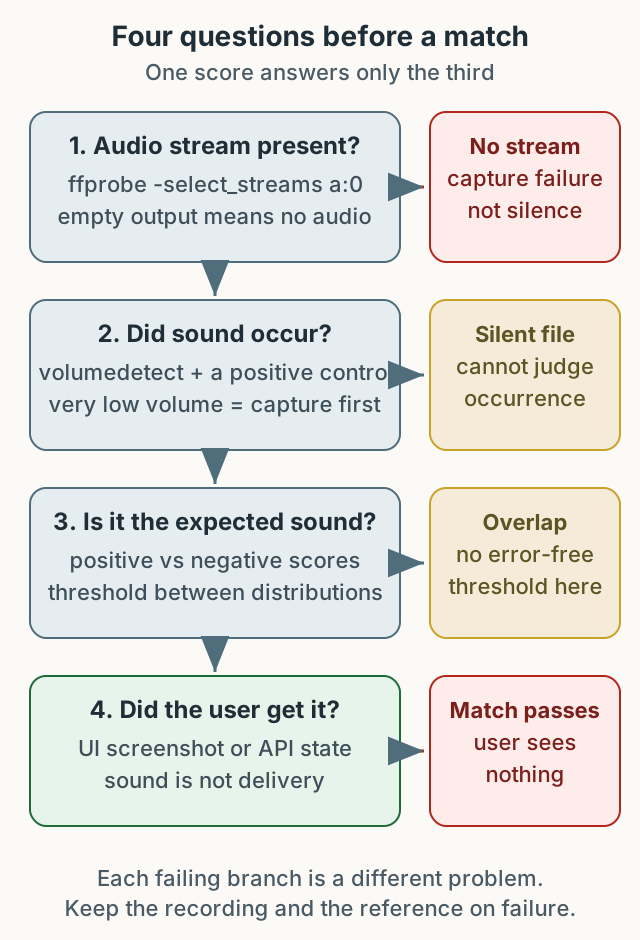
Figure 1. The four questions need different evidence. If the first one fails, the rest prove nothing.
What a fingerprint answers
An audio fingerprint does not compare waveforms. It extracts prominent peaks in time and frequency, turns them into hashes, and counts how many hashes overlap between a short recording and a reference. That is why it tolerates some compression and background noise.
worldveil/dejavu provides this in Python. The original environment ran PostgreSQL through Docker Compose and used the songs and fingerprints tables. Installation and run commands should come from the current README.
1
2
3
4
5
6
7
8
from dejavu import Dejavu

config = {
    "database": {"host": "127.0.0.1", "user": "dejavu", "password": "change-me", "database": "dejavu"},
    "database_type": "postgres",
}
djv = Dejavu(config)
djv.fingerprint_directory("reference_sounds/", [".mp3", ".wav"])
This is an abbreviated example of the shape. Configuration keys and supported databases vary by library version.
First check: does the recording contain audio?
Android’s adb shell screenrecord records video only and includes no audio (official documentation). Appium’s Android screen recording often uses the same command, so check the resulting file rather than assuming. The original states only that the device’s Screen Recording was used; whether that file contained audio cannot be verified here.
Run this only after confirming the file exists:
1
ffprobe -v error -select_streams a:0 -show_entries stream=codec_name -of csv=p=0 notification.mp4
Empty output means there is no audio stream. That is not “the notification did not play”; it is “the capture path did not record sound.” Extract only when a stream exists.
1
ffmpeg -i notification.mp4 -vn -acodec pcm_s16le notification.wav
Then check whether the extracted file is silent. This command is meaningful only when an audio stream exists, and it does not exercise the matching algorithm.
1
ffmpeg -i notification.wav -af volumedetect -f null -
If mean_volume and max_volume are extremely low, look at the recorder, permissions, and volume settings first. Matching a silent file returns “no match,” and reading that as “no notification” points at the wrong cause.
Choose a threshold with positive and negative controls
Dejavu returns a matched reference and a score. The hard question is the cutoff. Do not copy one from a tutorial: the distribution depends on the device, microphone position, volume, ambient noise, and OS audio processing.
Collect four kinds of samples in your own environment instead.
| Kind | Example | Expectation |
|---|---|---|
| Positive | The expected notification actually plays | High score against the reference |
| Negative A | Only other system sounds | Low score |
| Negative B | The notification does not play | Low score |
| Confuser | A different notification from the same app | Distinguishable |
If the lowest positive score sits clearly above the highest negative score, put the threshold between them. If the distributions overlap, no threshold on those samples separates them without error; a policy must trade false positives against false negatives, add a UI or API check, or change the recording conditions and signal. This procedure does not promise any accuracy figure.
Keep the samples used to choose the threshold separate from the samples used to validate it. Choosing and validating on the same samples cannot support a generalization claim. The original observation — matching despite a TV and family conversation — is one environment’s result, not performance under all noise.
Once a threshold exists, log the score and the version of the reference audio. A score alone cannot explain why a run passed after the reference changed.
A diagnostic table
| Symptom | Look at first | Meaning |
|---|---|---|
| Always “no match” | ffprobe output, signal presence, reference and time window | “No match” alone does not prove capture failure; check stream, signal, and reference in order |
| Mostly silence | Volume settings, microphone permission, recording start time | Cannot judge whether the sound occurred |
| Low positive and negative scores | Whether the reference is the actual notification | Reference mismatch or conversion loss |
| High negative score | Score gap against the confuser | False match; separate references or change the checkpoint |
| Match passes but the user sees nothing | UI screenshot, API state | Sound and notification display are separate |
“The right event happened but a different sound played” and “no sound played” are different failures. Both can score poorly against a single reference, so that score alone cannot distinguish them. Registering other notification sounds as references lets you check for a match to a different sound. Use the scenario step and time window to narrow down whether the cause lies in configuration, the sound asset, or audio acquisition.
Sound is not business completion
The sound occurring does not prove the notification was displayed correctly or the order was processed. Combine audio with UI or API checks. On failure, keep the original and extracted audio, the reference used, the score, and the scenario step. Keeping only the recording loses the comparison basis.
Verification boundary
The command patterns were checked only on synthetic files. With FFmpeg 8.1, a video-only MP4 produced empty ffprobe -select_streams a:0 output, a silent WAV reported pcm_s16le with mean/max -91.0dB, and a 440Hz tone reported -21.1/-18.1dB. That is a narrow check that stream selection and volumedetect behave as documented. Real device recording, Dejavu recognition, threshold accuracy, processing time, and business completion were not tested, and no recommended thresholds are given.
Three things are immediately actionable: check for an audio stream before matching, set the threshold from positive and negative controls, and retain both the recording and the reference on failure. With those, “did it make a sound” and “did the check fail” stop being the same question.