Mobile Test Automation with Mobile MCP: Cursor and Claude Desktop
Connecting an MCP-based mobile tool to Cursor and Claude Desktop, separating exploration from deterministic regression, and why a model's completion message is not evidence.
MCP (Model Context Protocol) lets AI tools call external systems and tools. Attached to mobile automation, it lets you say “find this button and tap it” in natural language. That is convenient, and the risk sits in the same place: the model saying “done” is not the same as the action having happened. This article covers the connection, then how to separate exploratory use from deterministic regression.
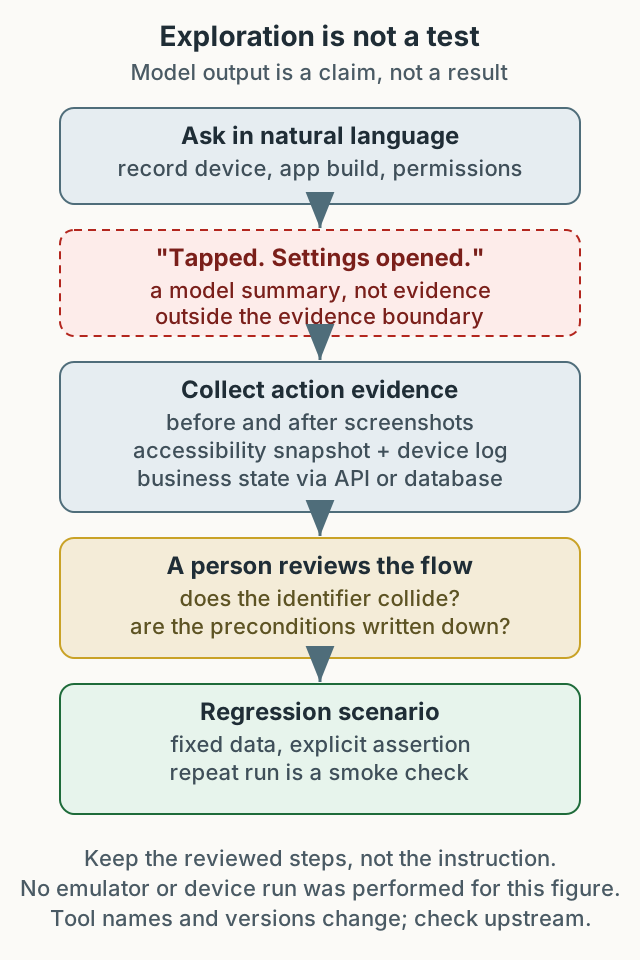
Figure 1. An exploration result becomes a regression scenario only after evidence and review. Model completion text is not evidence.
Exploration and regression are different problems
| Aspect | Exploratory use | Deterministic regression |
|---|---|---|
| Goal | Understand the screen and behavior quickly | Confirm the same result repeats |
| Input | Natural-language instruction | Fixed scenario and data |
| Judgment | A person checks screen and logs | Automated assertions and failure evidence |
| On failure | Decide the next attempt | Classify the cause and reproduce |
| Best stage | New features, quick checks | Repeated pre-release verification |
MCP-based tools are strong on the left. They read the accessibility snapshot, list elements, and perform taps, input, and screenshots without managing sessions and selectors the way Appium does. On the right they remain a supporting tool: the same instruction does not guarantee the same result, and model judgment cannot replace an assertion.
Setting up against current upstream
Package names and tool lists change. The configuration here is an example from the time of writing; before installing, check the current guidance in the Mobile MCP repository. Its documentation covers listing connected devices and includes Mobilewright examples; specific tool names vary by version.
1
2
3
node --version
xcode-select -p
adb version
Cursor can use the user-level ~/.cursor/mcp.json and the project-level .cursor/mcp.json. Record which one you registered.
1
2
3
4
5
6
7
8
{
  "mcpServers": {
    "mobile-mcp": {
      "command": "npx",
      "args": ["-y", "@mobilenext/mobile-mcp@latest"]
    }
  }
}
Claude Desktop on macOS uses ~/Library/Application Support/Claude/claude_desktop_config.json. Merge the mcpServers object with existing configuration and check the JSON syntax.
@latest points at different versions over time. If reproducibility matters, record the version actually resolved after installation and pin it when repeating an experiment.
Device and permission boundaries
- iOS simulator: list and boot with
xcrun simctl. Physical devices need trust approval. - Android emulator: record the AVD name and API level. Physical devices need USB debugging and a working driver.
- Organizational policy: use only allowed test devices. Exploring a phone signed into a company account can change account state.
A model easily treats “not in the accessibility tree” as “not on screen.” Buttons without labels, WebView internals, and canvas-rendered content may not appear. Coordinate taps are sensitive to resolution and display scale. “I could not find the element” therefore means the accessibility tree did not contain it, not that the screen does not.
Demand evidence, not completion text
MCP tool results can include text summaries, images, and structured results. Model prose such as “tapped” or “opened settings” must be distinguished from the tool output actually observed; the prose itself is not proof of screen state. Keep at least these:
- Before and after screenshots: compare whether the screen changed and whether it is the same screen.
- Accessibility snapshot: record the target element’s identifier and position.
- Device log or app state: check for crashes and screen transitions.
- Business state: confirm the outcome through an API or database read.
A screenshot alone cannot prove the right button was pressed; a snapshot alone cannot prove the screen changed. Both must point the same way before counting the action as done.
Turning an explored flow into a regression scenario
The steps below illustrate the workflow. They are not tied to a specific app or account; they show how exploration becomes a deterministic test.
- Explore: ask, “In Settings, turn the notification toggle off and back on.”
- Record: keep the element identifiers used, transitions, elapsed time, and failed attempts. Running the same instruction twice is a smoke check; two matching runs do not prove determinism.
- Review: a person checks screenshots and snapshots and confirms the identifier does not collide with another element. If it does, do not use it in regression.
- Pin: move the preconditions (device model, OS version, app build, locale, initial permission state), actions, and assertions into the existing framework’s scenario format. If considering a new route, compare the upstream README’s Mobilewright example too. This revision did not execute a scenario with that tool.
- Verify: run the scenario twice. If the second run fails, check waits, environment, unstable locators, and product defects as well as missing cleanup. One failure does not prove the cleanup step is missing.
The important artifact is not “the model succeeded” but “a reviewed, reproducible sequence remains.” Saving the natural-language instruction as the test means the same instruction behaves differently when the model or UI changes.
Destructive actions and permissions
MCP tools operate real devices. Payment, account deletion, and logout need confirmation even during exploration. Decide these in advance:
- Limit tools and apps, and use test accounts only.
- Require human confirmation for destructive actions.
- Retain tool-call logs and failure screenshots.
- Have a person review model-generated scenarios before execution.
Security-sensitive flows should not be delegated to MCP exploration yet. “AI replaces QA” is not a claim this article supports. What the tool saves is time on exploration and repetitive input.
Verification boundary
This revision did not run the MCP server against an emulator or device. It reflects the repository’s current documentation and examples; tool names and result formats vary by version. After installing, verify the connection, the device list, one tap, and one screenshot yourself.
Summary
MCP-based mobile tools lower the cost of exploration. Turning the result into regression verification needs action evidence, human review, and reproducible preconditions. Do not use the model’s completion message as an assertion; keep screenshots, snapshots, and business state together.