Building a Slackbot: Initial Setup
Creating a Slack app, enabling Socket Mode, and running Bolt for Python, plus the ack, server-side authorization, idempotency, and visible status a button-triggered job needs.
The first run of a Slackbot is not hard. Issue two tokens, handle one event, and it replies. The hard part comes next. A button visible in a channel is not permission, and Slack receiving an event does not mean the job finished. This article goes beyond the initial setup to what must be decided when a button actually runs work.
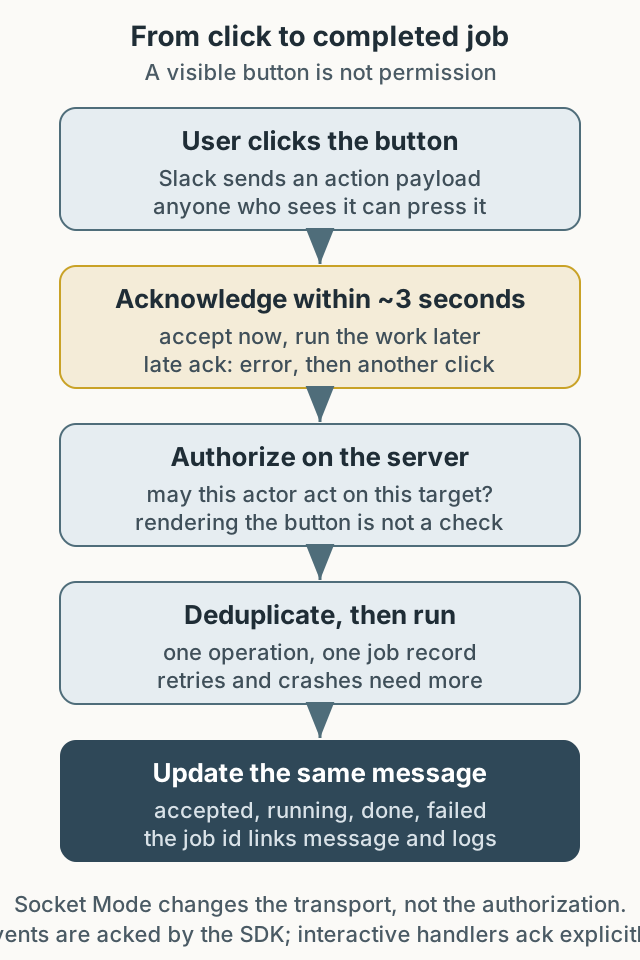
Figure 1. Between the Slack UI and the real work sit ack, authorization, deduplication, and status updates.
Why token setup is not enough
Testing work involves repeated data creation, account resets, test runs, and result checks. Doing them manually costs time, low-frequency procedures are easy to forget, and other teams ask the same questions. A Slackbot that collects these procedures in one place reduces that search time.
The problem is that “a button anyone can press” becomes “a permission anyone can exercise.” The original post lists functions built for convenience: resetting authentication attempt counts, looking up an account’s unique identifier, charging points, and processing orders. These change state, so the condition that shows a button and the condition that allows execution must be evaluated separately, on the server.
Why Socket Mode
The original explains moving from a web server with RTM to Socket Mode. Interactive messages require Slack to reach the internal PC, but security policy made direct inbound requests to the internal network impossible.
Socket Mode connects outward over WebSocket without exposing a public HTTP endpoint. If outbound connections are allowed, it removes the need for a reverse proxy. But Socket Mode only changes the transport. Whether the person who clicked is allowed to run that job, and whether the same request may run twice, are still server decisions.
Tokens and the smallest scope
A Slack app uses two kinds of token.
- Bot Token (
xoxb-): lets the bot act inside the workspace, sending messages and joining channels. The original example needsapp_mentions:readandchat:write. - App-Level Token (
xapp-): for app-wide capabilities such as Socket Mode. It needsconnections:write.
Wider scopes are convenient but enlarge the blast radius. Add only what is needed. Buttons and modals require Interactivity, and the scopes for those surfaces differ by feature; check the Slack scope reference. After changing scopes, the app may need to be reinstalled.
Never put tokens in source:
1
2
3
4
import os
from slack_bolt.async_app import AsyncApp

app = AsyncApp(token=os.environ["SLACK_BOT_TOKEN"])
Ack is not completion
Slack expects a response to an interaction within a deadline. The Bolt documentation says actions, commands, shortcuts, options, and view submissions need an acknowledgement, normally within three seconds (Bolt acknowledge docs). Those three seconds are not a budget for finishing the work; they are for saying the request arrived. A late acknowledgement shows the user an error, and the user may click again, starting the same job twice (interaction response docs).
A repeated click differs from an event delivery retry. The HTTP Events API automatically retries failed event deliveries and supplies an x-slack-retry-num header. Do not assume that rule applies to button actions. Socket Mode envelope acknowledgements are a separate transport concern handled by the SDK. Design button deduplication for repeated clicks and buttons in old messages rather than assuming automatic action redelivery.
Events are handled by the SDK. The original app_mention example that replies with say is valid because the SDK acknowledges the event; not every event handler needs a manual ack. A button action handler, however, must call ack() explicitly.
The table below shows the state the server should keep for the same click. Actual payload field names vary by event type and Slack version, so check the payload documentation before implementing.
| Order | Incoming item or state | What the server does | What to record |
|---|---|---|---|
| 1. Receive | Action payload (actor, channel, message ts, action id, target) | Determine a stable operation id, for example one the server issued into the button value | Raw payload, operation id |
| 2. Accept | Three-second response deadline | ack() so Slack knows the request arrived | Accept time |
| 3. Authorize | Actor and action/target | Check the actor allowlist and permission for that target/action together | Decision and basis |
| 4. Duplicate delivery | Same operation id already recorded | Do not start again; show the existing state | Existing job id, state |
| 5. Double click | Same operation id | Group it through the same path as 4 | Click count |
| 6. Later intentional repeat | New operation id | Accept it as a new job | New job id |
| 7. Execution and failure | Job record, queue handoff, worker | Persist a durable job result and make downstream work idempotent | Job id, attempt count, final state |
| 8. Completion | Result | Update the same message with chat.update | Success or failure and reason |
Duplicate delivery and a double click share one operation id. A user intentionally running the job again later needs a new operation id. Without that distinction, “run once” also blocks legitimate re-runs.
An operation id alone does not guarantee exactly-once execution. A SET NX TTL lock reduces concurrent duplicates, but TTL expiry, a worker crash, a lost queue handoff, or two authorized actors targeting the same object remain. Persist the job result durably, give downstream work its own idempotency key, or reconcile state periodically. The idempotency key should include workspace, action, and target as the operation requires; an actor-only key is insufficient.
The job flow: accept, authorize, dedupe, run, report
| Stage | What Slack sees | What the server must guarantee |
|---|---|---|
| Click | Action payload arrives | Ack within three seconds |
| Authorization | Who clicked | That user may act on that action and target |
| Duplication | Repeated clicks and double clicks are possible | The same operation id is grouped into one job. Crashes, TTL expiry, and concurrent runs need separate guarantees |
| Execution | Nothing visible | A job ID and progress state |
| Completion | A message update | Success or failure is visible |
Hiding the button is not enough. A user can click again or use a button in an old message. Check authorization on every action, rather than only when rendering the button. Reading a channel and user ID from the payload is not the same as verifying that the user is still allowed to perform that operation.
The original post contains no record of building such an approval boundary in production. Approved actors and execution limits are boundaries to add if publishing this today.
Make status visible
For a long-running job, the user must be able to tell “running” from “stuck.” Keep at least three things:
- Job ID: the key linking messages and logs.
- State: accepted, running, done, failed.
- Outcome and failure reason: a success-only message gives no basis for retrying.
Updating the same message with chat.update avoids piling up channel messages and keeps the failure visible in place. Putting the job ID in the response lets a reader find the logs when they ask about it later.
Execution model and operations
AsyncApp and AsyncSocketModeHandler are one option when events from several users must be handled concurrently. A synchronous Bolt handler can also run in a thread pool, so it is not accurate to say every other event waits merely because AsyncApp is not used. Asynchronous code does not mean the work should run before ack; accepting and executing are separate steps.
Operational advice:
- Store tokens in environment variables or a secret manager.
- Keep the command allowlist in server-side permission data, not in code.
- Require confirmation and an audit trail for destructive actions.
- Recheck installation after changing channel invitations or scopes.
An example repository is at slackbot-sample. Follow its current README for Docker. This article covers setup and the job boundary, not a full Modal View implementation.